We at Cook Medical love to engage with customers and industry partners on social media. (You can find us all here.)
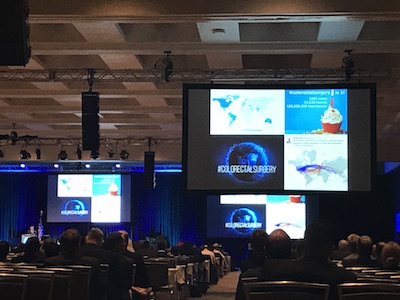
Dr. Richard Brady talks about #colorectalsurgery and Twitter at ASCRS.
Social media has already made a big impact for surgeons. To see it for yourself, take a look at the #colorectalsurgery hashtag. According to Dr. Richard Brady, it has seen more than 3,400 users and 31,000 tweets in its first year. Or take a look at the #Ilooklikeasurgeon hashtag, which started in August 2015 and is still going strong. Tweets get especially fun during academic meetings and congresses. By using hashtags like #ACSCC16, #ACPGBI2017, and #ASCRS17, you can easily engage with fellow attendees or follow the event from home. These event hashtags seem to be growing. According to this tweet by Dr. Sean Langenfeld, the #ASCRS17 hashtag was tweeted 6,723 times this year. In 2015, the #ASCRS15 hashtag was only tweeted 944 times.
During the recent tripartite meeting of the American Society of Colon and Rectal Surgeons (ASCRS), several surgeons spoke about their experience with social media.
Three social media strategies from this year’s ASCRS tripartite meeting
-
Share clinical data, said Dr. Des Winter (@des_winter).
In his talk, Dr. Winter explained how little we know about the world of science. Social media lets us connect with each other to share the bits of information we do understand. “Even when we have fantastic evidence, it doesn’t penetrate,” said Dr. Winter. “It doesn’t penetrate because it has no influence. This is precisely what social media can do now. Social media can influence the way we think about the evidence that’s already there. It doesn’t change the content, but it gives you access to it.”
-
Manage your reputation, said Dr. Sean Langenfeld (@seanlangenfeld).
On social media and on physician-rating sites, some surgeons occasionally see disgruntled posts. Dr. Langenfeld suggests not responding on the digital platform. “You’re fueling the fire. They’re looking for a response out of you,” said Dr. Langenfeld. Instead, he suggested addressing patient concerns in person. He also suggested developing an online defense. “Provide as much positive information as possible between the online consumer and unregulated [physician-rating] websites.”
-
Take some breaks, said Dr. Richard Brady (@researchactive).
Many surgeons experience information overload. Some feel pressured to stay connected at all times. This can lead to burnout. “Social media has great utility, but it’s addictive. We need to limit our use,” said Dr. Brady. The brain reacts strongly to novelty, and each notification we see on social media boosts dopamine levels. “You need to train your brain to focus on tasks for a longer period of time without distraction.” Dr. Brady offered some tips. “Use shorter and less emails. Remove your phone from your bedroom at night. Don’t blindly scroll through your timelines.”
If you have any more thoughts on this, let us know. Tweet us at @CookSurgery.

Biodesign® products from Cook Medical are constructed from small intestinal submucosa. But before our Biodesign products came into being, we had another line of small intestinal submucosa products. That product line was Surgisis®. In 2008, we created a new process for producing our small intestinal submucosa technology. Around that same time, we renamed the product line from Surgisis to Biodesign.
Our Biodesign product line for surgeons is similar to our Surgisis product line.
Why the changes?

Umesh, president of Cook Biotech, listened to surgeons’ suggestions.
When Cook Biotech first launched Surgisis products in 1998, they received positive feedback from surgeons. Umesh Patel, the president of Cook Biotech, remembers it clearly. Umesh was part of the team that first developed products from small intestinal submucosa. He and the Cook Biotech team worked hard to create Surgisis products, which were the first small intestinal submucosa products for surgeons.
“We heard surgeons talking about how it could be improved,” says Umesh. “We’re always interested in improving our product.” His team took a closer look at the product. They saw room for improvement in its handling characteristics and its biologic attributes. “We wanted to make a purer biomaterial. Lipids don’t have a place in the healing process. So, we reduced the amount of lipid in the material while maintaining other components that do have a place in the healing process.”
Then, they performed nonclinical studies. They saw more robust blood vessel ingrowth into the new material.1 They found that the new material rehydrated faster.1 In order to improve the operative performance of the Biodesign Hiatal Hernia Graft and Biodesign Hiatal Graft, they included a quilting process.
“We were satisfied once we saw the results of the clinical performance,” says Umesh. “We still continue to focus on improving our products and developing new ones.”
Learn more about small intestinal submucosa.
1 Data on file at Cook Biotech
Cook Medical’s Doppler Blood Flow Monitor is used for monitoring blood flow in vessels intraoperatively—for flap monitoring and to monitor vessels following reconstructive microvascular procedures and reimplantations. The monitor is designed to provide audible (primary) and visual (secondary) feedback of blood flow when connected to Cook-Swartz Doppler Probes and extension cables. Blood flow can be monitored continuously or periodically as required.
Watch the five instructional videos below to learn more about the Doppler Blood Flow Monitor.
Video 1: Surgical placement
4264122963001
brightcove
true
Watch a surgeon place a probe, and learn how to best position the cuff.
[Transcript] Upon completion of the surgical anastomosis, the Cook-Swartz Doppler Probe is placed around the vessel, with the probe crystal situated as far as possible from adjacent vessels, to limit the reception of flow signals from them. Many physicians have noted that it is preferable to monitor the venous blood flow. It has been demonstrated that monitoring the vein assures that blood is flowing through both the artery and the vein. Some physicians prefer to monitor the artery, or both vessels simultaneously.
Proper placement of the cuff depends on the type of procedure being done and surgeon preference. Some surgeons have suggested that during an end-to-side anastomosis, the cuff be placed proximal to the anastomosis in order to get a signal most indicative of profusion of the free flap. During an end-to-end anastomosis, some surgeons suggest the cuff be placed distal to the anastomosis.
Trim the curved silicone cuff to accommodate the vessel size. The cuff length should allow close approximation of the probe crystal to the vascular adventitia. Position the silicone cuff around the targeted blood vessel, ensuring that the probe crystal is directed toward the targeted vessel. Secure the free ends of the silicone cuff together using appropriate sutures or a clip to maintain cuff position.
Plug the silver end of the extension cable into either of the two channels. Attach the red end of the probe to the red end of the extension cable, aligning the black dots. Stabilize the location of the probe by suturing the braided wire adjacent to the incision site, leaving some slack to alleviate tension on the cuff. Enough wire should be provided so that there is no tension on the vascular anastomosis. The retention tab may be placed over the braided wire and sutured or taped to the skin to provide additional strain relief.
Video 2: Intraoperative troubleshooting
4264122964001
brightcove
true
Make sure the probe can pick up signals from the patient’s blood vessel.
[Transcript] Once the monitor has been turned on, the blood flow should be heard. The LED light indicators represent the relative velocity of the blood cells passing by and within range of the probe crystal. The higher the velocity the more of the indicators are illuminated. If a signal is not heard, the following steps should be taken: Irrigate the probe with saline where it wraps around the blood vessel adventitia. An audible signal, the primary indicator, and visual signal on the LED display, the secondary indicator, verify that the device is functioning properly.
“If you irrigate and you can hear that signal, that means the probe is working.” (Dr. Michael L. Gimbel, University of Pittsburgh Physicians Aesthetic Plastic Surgery Center, Division of Plastic and Reconstructive Surgery.)
The probe could be too loose. This can be confirmed by pressing or tapping on the probe to check its snugness. Tap or press near the location of the end of the probe, being careful not to put tension on the probe wire to avoid potential dislodgment of the probe. A correctly functioning probe should detect this action, and the monitor should deliver both an audio and visual signal. Also, a patient’s movement can lead to audible and visual signal responses from the blood flow monitor, indicating that the probe is working. If the probe still does not produce an audible signal, the probe is either malfunctioning or has been dislodged. Blood flow has been disrupted during patient repositioning, or blood flow has become restricted.
After it has been verified that the probe is functioning properly, the incision site should be closed using standard techniques. It is helpful to listen to the blood flow from the monitor during the flap inset and wound closure. These maneuvers will often cause compression on the vascular pedicle and the Cook Doppler Blood Flow Monitor can help detect this compression.
“The probe is really marketed for a postoperative monitoring of flaps. I find it very useful intraoperatively as well because, maybe less so for breast flaps, but even sometimes for breast flaps, but more so for extremity flaps when you are suturing the flap down. Often it can be tight and there’s not a lot of room for the pedicle to distribute itself and it can become kinked or it can become compressed, and you don’t know that once the flap is inset. You don’t know that immediately unless you have something that’s actually listening to the vessels.” (Dr. Gimbel)
Video 3: Probe removal
4264122965001
brightcove
true
You only need to tug lightly on the probe to detach it from the patient’s blood vessel.
[Transcript] After the physician has determined the flap is healing well and blood flow has been established, the crystal must be removed by the following steps:
Remove sutures or tape from the wire outside the wound, and from the retention tabs.
Tug gently on the wire near the crystal to disengage it from the cuff. Only one-tenth of a pound of pressure is needed to remove the crystal from the cuff.
Leave the silicone cuff. It remains permanently in place around the vessel.
Alternative methods of discontinuing use of the probe, such as cutting the wire and tucking it into the wound, are not recommended, and are contrary to approved instructions for use.
Video 4: Using the monitor
4264122966001
brightcove
true
Learn about the controls and functions of the Doppler Blood Flow Monitor.
[Transcript] The Doppler Blood Flow Monitoring System has been designed for ease of use. The power switch turns the unit on and off. The low-battery LED light will illuminate when the battery should be charged. The monitor operates on an internal lithium ion rechargeable battery, which allows long-term monitoring and battery conservation. Attach the supply charger to the back of the unit and charge the internal battery until the indicator on the top of the charger illuminates green. It is important to use the charger labeled “Doppler Blood Flow Monitor Battery Charger.” Other chargers could potentially damage the monitor.
The volume control adjusts the loudness of the audio output. The LED lights will illuminate as the volume is raised or lowered. The blood flow indication lights allow visual blood flow confirmation, although sound remains the primary indicator.
Select the desired channel by pressing the “Channel” button to ensure that the LED that corresponds to the desired channel is illuminated. The two channels allow the connection of either one or two probes to the monitor via the extension cable. The “Test” button will produce a steady tone indicating that the unit is functioning properly.
The integrated pole mount allows for easy placement on a bedside pole. When securing the Cook Doppler Blood Flow Monitor onto the pole, first, ensure the flat surface is flush against the pole. Then, secure the monitor by turning the screw clockwise. The red dots on the monitor’s channel and the silver end of the extension cable must be aligned. Press the end of the extension cable into the channel until it is lodged firmly in place. When connecting the probe to the extension cable, attach the red end of the probe to the red end of the extension cable, aligning the black dots.
The Cook Doppler Blood Flow Monitoring System may be cleaned with a mild detergent or isopropyl alcohol. Prior to cleaning, make sure that the monitor is not connected to a power supply. Do not immerse the unit in a solution or allow a solution to enter the connector inputs, outputs, or speaker grill.
The Cook Doppler Blood Flow Monitoring System gives you a way to directly monitor the target vessel. It is implantable. The probe attaches directly to the target vessel, providing a precise means of monitoring blood flow without interference from neighboring vessels or tissues. It is continuous. This continuous monitoring allows loss of patency or thrombosis to be detected immediately. It is clear, with both audio and visual confirmation. The blood flow is easy for both the clinician and the healthcare staff to monitor.
Video 5: Postoperative troubleshooting
4264122967001
brightcove
true
If you don’t see or hear a signal from the monitor after the surgery, do some quick troubleshooting to rule out mechanical error.
[Transcript] If no audio or visual signals are identified, the following steps can be taken:
Test the probe function by pressing or palpating near the probe’s site for better crystal contact, or consider repositioning the patient. With the monitor turned on, press the “Test” button. A tone should verify that the monitor’s internal circuitry is functioning properly. The combined channel and cable verifier may then be used.
To test a channel, plug the silver end of the verifier into a channel on the monitor. Rub the clear resin surface until the monitor makes a sound. If the monitor doesn’t make a sound, there is a problem with the channel.
To test the extension cable, plug the extension cable into a channel on the monitor. Plug the red end of the verifier into the extension cable. Rub the resin surface until the monitor makes a sound. If the monitor doesn’t make a sound, there is a problem with the cable.
If the unit is functioning correctly and the blood flow cannot be heard, contact the physician immediately.
Dr. Gimbel is an independent physician with no financial ties to Cook Medical.
In November, Dr. Anderson spent a few days away from his practice in Montana. He traveled to Henderson, Nevada, to attend a Cook Vista training lab about component separation.
This was Dr. Anderson’s first time at a Cook-sponsored training lab. Surgeons around the globe deal with organizational changes, information overload, and high expectations from their patients (more about that here). Many turn to training labs to learn advanced techniques and to stay ahead of the curve.
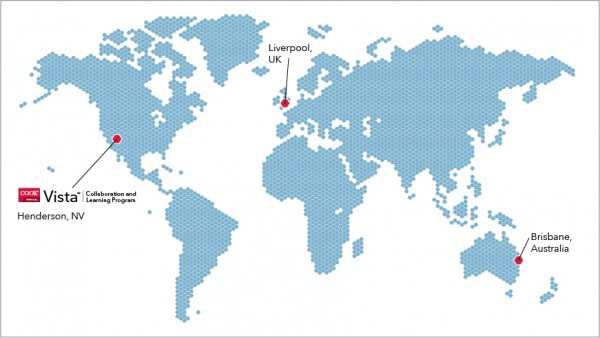
Dr. Anderson, Mr. Rooney, and Jodie spoke with us from these Vista locations.
The point of the spear
Some surgeons attend a lab in order to build relationships with other attendees and faculty. At Cook Vista training events, top surgeons lead lectures and labs. “Especially for being sponsored by Cook, the lecturers were fairly unbiased,” Dr. Anderson says. “A highlight for me was hearing the people who are on the point of the spear in the hernia world talk about what they do in complex cases.”
One of those surgeons is Mr. Rooney from Liverpool. He’s a faculty surgeon in the U.K., and has been a partner with Cook’s surgery division for years. “Cook as a company is focused on product development, research, and education,” Mr. Rooney says. “I’m not forced into plugging Cook in our educational work.”
Vista events are designed that way: to focus on education, not on selling products. Jodie O’Bryan leads Vista events in Australia. “The overall goals of the training labs,” she says, “are to foster collaborative partnerships, provide clinically relevant education, and provide product support.”
Organizing and informing
To assemble a Vista event, Jodie prepares the faculty surgeon, finds a venue, coordinates travel, and secures a lab. “We want the attendees to experience a well organized and informative training lab,” she says. She’s rewarded when she hears the attendees’ praise. Her favorite praise to hear is: “This is one of the best training events I’ve ever attended.”
Dr. Anderson attended a lab far away from Jodie’s hometown of Brisbane. Still, his experience at Vista will make her proud. “It was very well organized,” he says. “Being able to try out the techniques right after we talked about them was very helpful. The lecturers did a great job.”
See the full schedule of Cook Vista events.